
Your client's events page is still advertising the summer fundraiser. It's October. Nobody unpublished it, because nobody remembered to, and now the first thing visitors see is something they can't go to.
If you build sites with events, job vacancies, courses or time-limited offers, you've met this problem. Divi 5's Loop Builder is great at listing posts, but it has no idea what day it is. So the fix usually falls to a person with a calendar reminder, a scheduled draft, or a custom query in a child theme.
I wanted something that just handled it, so I built Date Conditions for Divi.
What it does
The plugin adds two settings to Divi's own Loop options.
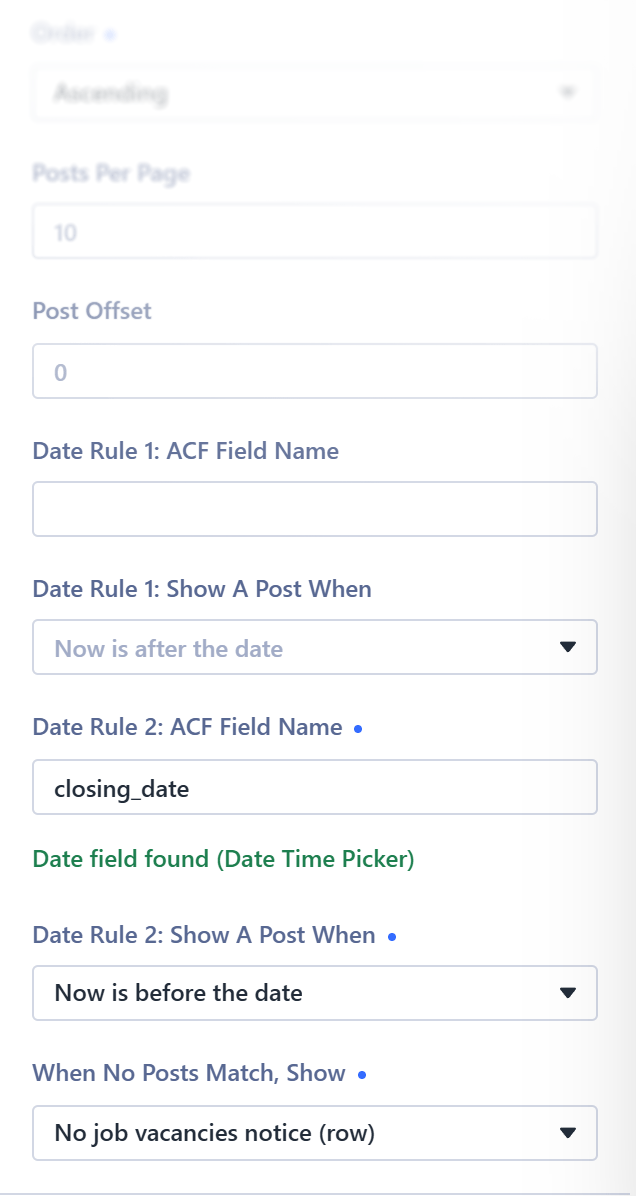
Date rules. Show a post only when now is before, after or equal to a date stored in an ACF field on that post. You can add up to two rules, and both must pass. Set it once and posts appear and disappear on schedule, with nothing to save or unpublish.
Empty state. Pick a Divi Library item to show when no posts pass the rules. Visitors then see something like "No upcoming events, check back soon", designed in Divi like the rest of the page. Without one, Divi shows its standard "No Results Found".
It works on sections, rows, columns, groups and modules, for Loops that query Post Types, or Current Page in Theme Builder templates.
An example
Say you want an events page that only lists events people can still book:
- Rule 1:
booking_opens, Now is after the date - Rule 2:
event_ends, Now is before the date - Empty state: a Library section saying "No upcoming events, check back soon"
Events appear the moment booking opens and drop off when they finish. When the calendar runs dry, the message takes over. The same setup works for vacancies with a closing date, courses with an enrolment window, or offers with an end date.
For developers: how it works
The rules filter the query itself. The plugin adds a meta_query to the Loop's WP_Query through Divi's divi_loop_data_before_execution hook, so pagination and page counts only count posts that pass. Nothing is hidden after render.
A few details:
- It supports ACF Date Picker and Date Time Picker fields, including fields inside Group fields.
- Date-only fields count as 23:59:59 on that day. Times use the site timezone.
- A post with no value in the field is always shown for that rule.
- The builder checks each field name and warns you if it can't be found or isn't a date field. Invalid rules are ignored.
- It uses public Divi hooks only, with no private methods and no parsing of rendered HTML. Some of those hooks are in Divi's source but not yet in its developer docs, so I re-check them after Divi updates.
- Pages using the plugin get their module CSS inline, the same approach Divi uses for random-order Loops, so Divi's static CSS cache can't go stale as results change.
The full spec, build plan and test matrix are in the GitHub repo if you want to dig in.
I built it with Claude Code, working from that spec and checking each stage against the test matrix.
What you need
- Divi 5.8.1 or later
- Advanced Custom Fields (free or PRO) or Secure Custom Fields
- PHP 7.4 or later
Turn off page caching for pages that use date rules. The results change as time passes, so a cached page will show yesterday's list. If the plugin seems not to work, check this first.
Current limits: Repeater and options-page fields aren't supported, accordion items, slides and tabs can't have an empty state, and the builder preview for Current Page Loops isn't filtered (the live page is).
Get it
Date Conditions for Divi is free and MIT-licensed. It's tested and stable on real sites, and feedback is welcome.
Download the latest release from GitHub
Upload the zip under Plugins → Add New → Upload Plugin. After that, new versions arrive through Dashboard → Updates like any other plugin. Found a bug or have an idea? Open an issue on GitHub.



0 Comments